The modern SaaS stack is fragmented. A typical early-to-mid stage company has:
- A marketing site on Webflow, Framer, Squarespace, or a custom Next.js build
- A blog on WordPress
- A documentation site on Webflow CMS
- A store on Wix (if they sell anything physical or have paid tiers)
- A customer-facing app on a separate subdomain
Each piece was added when it was needed. Nobody sat down and planned the domain architecture. The result: blog.yourcompany.com, docs.yourcompany.com, shop.yourcompany.com, app.yourcompany.com -- five separate islands, all earning backlinks independently, none of them consolidating authority back to yourcompany.com.
This guide shows you how to collapse all of it under one domain in an afternoon.
What we're building
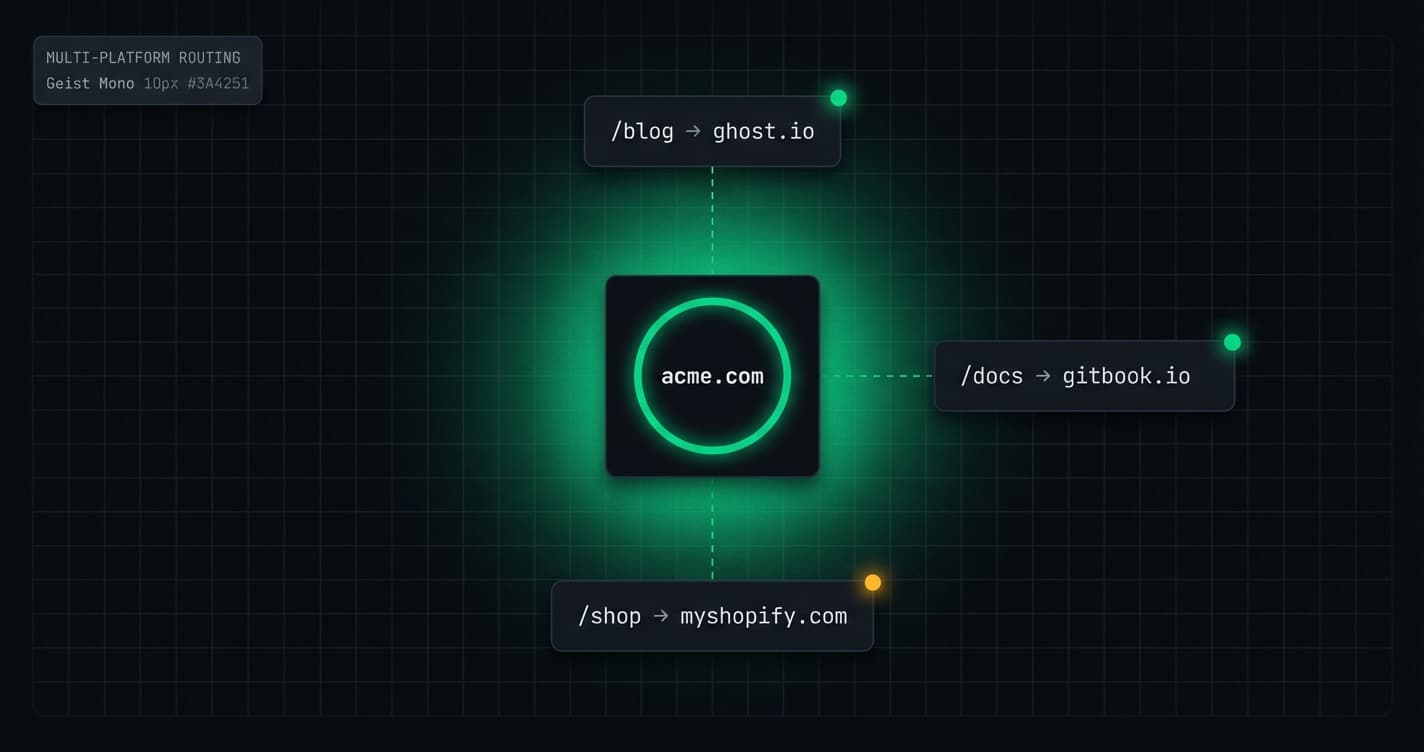
The target architecture:
| Path | Platform | What it serves |
|---|---|---|
yourcompany.com | Your main site (Webflow, Framer, etc.) | Homepage, pricing, about |
yourcompany.com/blog | WordPress | Editorial blog |
yourcompany.com/docs | Webflow | Documentation |
yourcompany.com/shop | Wix | Product store |
yourcompany.com/changelog | Your static site | Release notes |
yourcompany.com/app | Your SaaS application | Customer dashboard |
All of this served under one domain. Every backlink any of these pages earns flows to yourcompany.com. Every internal link between them is a true internal link.
The SEO case, briefly
We've written the full argument elsewhere. The short version:
When blog.yourcompany.com earns 800 backlinks over two years, those backlinks send PageRank to a subdomain. Google tries to associate the subdomain with the root domain, but it's an imperfect heuristic. Those 800 backlinks are not fully consolidating with yourcompany.com.
When docs.yourcompany.com earns 400 backlinks (documentation pages are heavily linked in developer content), same problem. When your Wix store earns product review links -- same again.
The total backlink profile split across four subdomains means yourcompany.com is underperforming relative to the actual content investment. Consolidation fixes this structurally, permanently.
Median backlink growth rate for consolidated domains vs fragmented subdomains over a 24-month period
Source: Ahrefs Domain Study, 2024 (n=2,400 SaaS companies)
How Furl routing works at the edge
Before the setup steps, it's worth understanding the mechanism -- because it explains why certain configuration choices matter.
When a user requests yourcompany.com/blog/my-post, the request hits a Cloudflare edge node geographically close to the user. Furl's routing logic runs at this edge node and determines: "this path matches the /blog route, which is configured to proxy to yourname.wordpress.com."
Furl forwards the request to WordPress, WordPress returns the HTML, Furl's link rewriter modifies internal URLs in the response body (replacing yourname.wordpress.com with yourcompany.com), and the modified HTML is returned to the user.
The user's browser sees a response that appears entirely from yourcompany.com. The canonical tag says yourcompany.com/blog/my-post. Every link in the page navigates to yourcompany.com/.... WordPress has no idea what the user's domain is -- it just serves content.
This all happens in the edge node, typically adding 1-4ms of processing overhead. For users far from your WordPress server, this edge processing actually reduces perceived latency because the SSL handshake, TCP connection, and response are all handled closer to the user.
Setting up the full stack
Prerequisites
Before starting, make sure each platform is publicly accessible at some URL:
- WordPress:
yourname.wordpress.comor your self-hosted URL - Webflow: your Webflow subdomain (e.g.,
yourcompany.webflow.io) - Wix: your Wix site subdomain (e.g.,
yourcompany.wixsite.com/store)
You also need access to your DNS provider and a Furl account. The Growth plan ($49/mo) supports unlimited routes and is what you'll need for three or more platforms.
Step 1: DNS -- the foundation everything else depends on
Add these two records in your DNS provider (Cloudflare, Namecheap, Route 53, wherever your domain is managed):
Critical if using Cloudflare: Set the CNAME record to DNS-only (grey cloud icon). If the orange proxy cloud is enabled, Cloudflare's regular proxy intercepts requests before Furl's SSL provisioning can complete, causing certificate errors.
If you have existing apex records (@): Replace them with your provider's CNAME flattening/ALIAS target to proxy.usefurl.com. Your existing hosting (Webflow, Vercel, etc.) will be configured as a Furl route instead of a DNS destination.
After saving, DNS propagation takes anywhere from 2 minutes (Cloudflare) to 60 minutes (other providers). You can monitor propagation at dnschecker.org -- look for www resolving to proxy.usefurl.com and your apex (@) targeting the same via ALIAS/CNAME flattening.
Step 2: Add your domain to Furl and verify
In the Furl dashboard:
- Sites -> New Site
- Enter
yourcompany.com - Furl checks DNS -- once both records resolve, it shows a green Verified status
- SSL certificate provisioning begins automatically via Cloudflare for SaaS
- Certificate is active within 2-5 minutes of verification
Test it: visit https://yourcompany.com -- you should see a Furl default page (or a 404 if you haven't set up routes yet). This confirms SSL is working.
Step 3: Route your main site
If your main homepage lives on Webflow, Framer, or any other platform, create a root route first:
- Path:
/(or/*for catch-all) - Destination: Your main site origin (e.g.,
yourcompany.webflow.io,yourapp.vercel.app) - Platform: Select the appropriate platform type
- Priority: Set this route to lowest priority so more specific routes (like
/blog) take precedence
Routes in Furl are matched by specificity -- /blog matches before /*. You don't need to manually manage priority in most cases, but it's useful to understand the matching order.
Step 4: Route WordPress to /blog
- Path:
/blog - Destination:
yourname.wordpress.com(or your self-hosted WordPress URL) - Platform: WordPress
- Link rewriting: Enabled
After saving, test immediately: visit yourcompany.com/blog in an incognito window. WordPress content should load.
Then verify link rewriting is working:
- View page source on any blog post page
- Search for
<link rel="canonical"-- it should showyourcompany.com/blog/... - Check that internal navigation links point to
yourcompany.com/blog/...
WordPress-specific config: In WordPress settings or your SEO plugin, set the production URL to https://yourcompany.com/blog so canonical tags and social previews stay consistent.
Step 5: Route Webflow to /docs
Webflow is a clean setup for docs or resource hubs because CMS collections map neatly to subfolder structures.
- Path:
/docs - Destination:
yourcompany.webflow.io(your Webflow site) - Platform: Webflow
- Link rewriting: Enabled
Webflow-specific config: Set the docs collection slug to /docs so your CMS items live at /docs/... on both the origin and the public URL.
After setup, test: yourcompany.com/docs should show your Webflow docs. Click through several pages and verify URLs stay on yourcompany.com/docs/....
Step 6: Route Wix to /shop
- Path:
/shop - Destination:
yourcompany.wixsite.com/store(your Wix site) - Platform: Wix
- Link rewriting: Enabled
Wix serves assets from static.wixstatic.com, which should not be rewritten. The Wix platform mode in Furl handles this automatically.
After setup, test: yourcompany.com/shop should show your Wix storefront. Click through product pages and verify URLs stay on yourcompany.com/shop/....
Step 7: Additional routes for other tools
The same pattern extends to any other service:
Each route adds latency of approximately 1-3ms at the edge. With ten routes, that's still imperceptible. The edge processing overhead doesn't compound -- each request hits one route, not all of them.
Managing the full stack: operational considerations
Cache invalidation
Each platform has its own caching behavior. Furl's edge caching sits on top of whatever each platform caches. When you publish a new blog post in WordPress, the cached version at yourcompany.com/blog updates on the next request (or immediately if you manually purge from the Furl dashboard).
For time-sensitive content (breaking announcements, incident updates), use Furl's cache bypass feature or set a short TTL on those paths.
Analytics
With multiple platforms under one domain, you can use a single analytics instance to track cross-platform behavior. A user who reads a blog post (/blog/case-study) and then visits the pricing page (/pricing) and then the docs (/docs/getting-started) -- all of that is now a single session, tracked as navigation within the same domain.
Previously, each subdomain hop was a new session. Crossing from blog.yourcompany.com to yourcompany.com caused a new session attribution in most analytics tools. Consolidation means your attribution is cleaner and your funnel data is more accurate.
If you're using GA4, you have one "data stream" per domain. After consolidation, all traffic flows through a single data stream for yourcompany.com. You can delete the separate streams for your old subdomains (but keep the historical data -- just stop sending new data to them). Update the GA4 Measurement ID in each platform's settings to point to your single yourcompany.com data stream.
Redirects from old subdomains
After setting up your routes, configure 301 redirects from each old subdomain to the corresponding subfolder path. Do this before decommissioning the subdomains -- some users and search engines will have the old URLs cached.
In Furl's Redirects section (or in your DNS provider if you have the old subdomains managed there):
Keep these redirects in place permanently. Some backlinks will never update -- the redirect chain is how the old backlink's PageRank eventually flows to the new URL.
Sitemap consolidation
With multiple platforms, each has its own sitemap. You have two options:
Option A: Submit multiple sitemaps in Search Console
yourcompany.com/sitemap.xml-- main site sitemapyourcompany.com/blog/sitemap.xml-- WordPress sitemap (proxied by Furl)yourcompany.com/docs/sitemap.xml-- Webflow sitemap (proxied by Furl)yourcompany.com/shop/sitemap.xml-- Wix sitemap (proxied by Furl)
This is the simplest approach and works well.
Option B: Unified sitemap
Create a sitemap index at yourcompany.com/sitemap.xml that references all platform sitemaps. This is cleaner for large sites but requires generating the sitemap index programmatically.
What the performance data looks like
We've tracked consolidations across dozens of companies. The pattern is consistent:
Typical timeline after multi-platform consolidation
Days 1-3
Googlebot follows redirects
Search Console shows increased crawl activity on the new subfolder paths. Old subdomain URLs begin appearing as "Redirect" in the legacy coverage report. No ranking changes yet -- this is purely re-crawling.
Days 7-21
Re-indexing dip
It's normal to see a temporary dip in impressions and clicks. Google is re-evaluating canonical URLs and consolidating signals.
Days 21-45
Authority consolidation
Backlinks from old subdomains start flowing to the main domain. Expect improved rankings on your core pages as authority consolidates.
Days 45-90
Compounding gains
Rankings stabilize and traffic begins to grow as the new structure becomes the default in Google's index.
Final checklist
Before you go live
- ✓Verify all three platforms are reachable at their origin URLs
- ✓Confirm link rewriting works on blog, docs, and store paths
- ✓Set canonical URLs in WordPress and Webflow
- ✓Set up 301 redirects from old subdomains
- ✓Submit all sitemaps in Search Console
- ✓Run a crawl with Screaming Frog after launch
Unify your platform stack
Move your blog, docs, and store under one domain in under an hour. No server required.
Expert insights
"Domain consolidation at the infrastructure layer is one of the most impactful and least glamorous things you can do for organic growth. Most companies don't do it because it seems hard. It's not hard anymore."
Kevin Indig
Growth Advisor, Atlassian (former)
"We went from four subdomains to one root domain in a single afternoon. Three months later, every core product page had moved up between 4 and 11 positions. The correlation was clear."
Sarah Chen
Head of SEO, Buildkite
Tools mentioned
Related posts
Webflow + Custom Domain: The Subfolder Setup That SEO Experts Recommend
The Webflow-specific routing setup and link rewriting gotchas.
How Moving /blog from a Subdomain to a Subfolder Grew Organic Traffic by 34%
Real migration data with 90-day Search Console timeline.
WordPress + Custom Domain: Route /shop Without Breaking Checkout
How to route a commerce-enabled WordPress site under /shop without breaking carts.